what cable do i need?
Moderator: Moderators
-
weedguru_animal
- Ganja God

- Posts: 6562
- Joined: Tue Jul 16, 2002 6:07 pm
- Location: south
- Contact:
what cable do i need?
My mate, Rizzo, from work, gave me tonight, a logitech x540 set of surround sound speakers and sub woofer. All cables are present in The Package, apart from the essential cable to connect sub to PC. The holes in the sub woofer are Front, Rear, Sub/Center...what cable do I need to connect to those three and my desktop audio IN???
-
Gorecore
- Weedguru Grampy
- Posts: 4115
- Joined: Wed Dec 01, 2004 8:33 pm
- Location: Nova Scotia, Canada
- Contact:
Re: what cable do i need?
Does this look like your subwoofer, by chance?
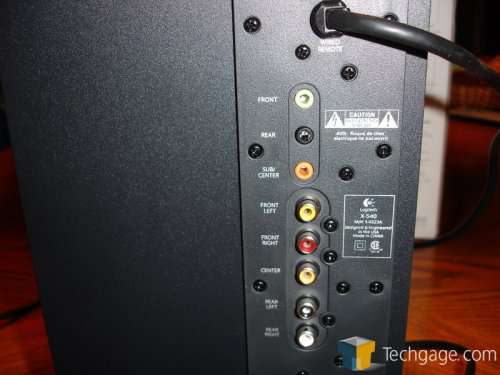
Plug your satellite speakers as directed into the sub. Run a cable from the green port on the sub to the green port on your soundcard...same with the black to black.
If this doesn't help or proves more confusing, post up a picture of the subwoofer and the area of your computer where the audio wires go in.
EDIT: I just re-read your post and mis-read it the first time. Sorry mate, li'l stoned here.
You'll need two cables with connectors exactly like these.

I'm not sure what the cables are called but the tips of them are 1/8 inch. The same size as most standard headphone jacks.
Plug your satellite speakers as directed into the sub. Run a cable from the green port on the sub to the green port on your soundcard...same with the black to black.
If this doesn't help or proves more confusing, post up a picture of the subwoofer and the area of your computer where the audio wires go in.
EDIT: I just re-read your post and mis-read it the first time. Sorry mate, li'l stoned here.
You'll need two cables with connectors exactly like these.
I'm not sure what the cables are called but the tips of them are 1/8 inch. The same size as most standard headphone jacks.

-
weedguru_animal
- Ganja God
- Posts: 6562
- Joined: Tue Jul 16, 2002 6:07 pm
- Location: south
- Contact:
Re: what cable do i need?
that is my subwoofer, mate...my soundcard on the back of the desktop has one red, one green, one blue socket. Red is for Mic, Green is for Audio out, and I have no idea of what the blue is for...I did some research lastnight, and found this:
The satellites all get connected to the subwoofer (that's how they get their power) ... you don't need more than one "audio out" jack from the PC.
Look behind the sub & connect the speakers to it .... the sub gets connected to the green plug behind your PC.
5.1 is emulated via the subwoofer ... you don't need a new sound card.
so it seems I do need a 3 into one cable...???As the ONLY connection tothe desktop needs to be in the normal green Audio Out socket. The sub woofer splits and plays with the sound. But where do I get a three into one cable from??? Do i need to have all holes filled...as in Front, Rear, Sub/Center/>???
The satellites all get connected to the subwoofer (that's how they get their power) ... you don't need more than one "audio out" jack from the PC.
Look behind the sub & connect the speakers to it .... the sub gets connected to the green plug behind your PC.
5.1 is emulated via the subwoofer ... you don't need a new sound card.
so it seems I do need a 3 into one cable...???As the ONLY connection tothe desktop needs to be in the normal green Audio Out socket. The sub woofer splits and plays with the sound. But where do I get a three into one cable from??? Do i need to have all holes filled...as in Front, Rear, Sub/Center/>???
-
Gorecore
- Weedguru Grampy
- Posts: 4115
- Joined: Wed Dec 01, 2004 8:33 pm
- Location: Nova Scotia, Canada
- Contact:
Re: what cable do i need?
That's a good question about the 3-in one wire set up. I haven't seen a subwoofer with an orange jack, nor have I seen a soundcard with one.
I know my subwoofer has a black wire and a green wire running to my black and green ports on the back of my PC. And yes, the satellites plug into the sub to get their power.
If I unplug my black cable, my left and right rear speakers go dead. I don't have any additional cables running to make my subwoofer work.
Not sure, but you might be able to plug your black port into your green, along with your green, if you have something like this:

You'd still have to buy two cables like the one I showed above.
Shit man, I wish you lived nearby so I could pop over and see what's what and get that set up for you. Hope you get your tunes working!
I know my subwoofer has a black wire and a green wire running to my black and green ports on the back of my PC. And yes, the satellites plug into the sub to get their power.
If I unplug my black cable, my left and right rear speakers go dead. I don't have any additional cables running to make my subwoofer work.
Not sure, but you might be able to plug your black port into your green, along with your green, if you have something like this:
You'd still have to buy two cables like the one I showed above.
Shit man, I wish you lived nearby so I could pop over and see what's what and get that set up for you. Hope you get your tunes working!
-
(weedguru)scarf
- Ganja God
- Posts: 5762
- Joined: Tue Oct 11, 2005 12:50 pm
- Contact:
Re: what cable do i need?
mine is simply the green one like core mentioned... it runs from the sub to the headphone jack in my laptop
woah
-
weedguru_animal
- Ganja God
- Posts: 6562
- Joined: Tue Jul 16, 2002 6:07 pm
- Location: south
- Contact:
Re: what cable do i need?
cheers for the help mr gore...but i am happy to have bought a $4 lead and connected two of the six speakers to the sub and my PC, and the sound quality is wicked.
-
Gorecore
- Weedguru Grampy
- Posts: 4115
- Joined: Wed Dec 01, 2004 8:33 pm
- Location: Nova Scotia, Canada
- Contact:

-
Weedguru_RyaNayR
- The Duke of Dope

- Posts: 1664
- Joined: Thu Oct 20, 2005 9:11 pm
- Location: The Sky
- Contact:
Re: what cable do i need?
that is the same subwoofer i have... or very, very close. so must be a similar speaker system... Mine is Logitec as well. they are badass.
Who is online
Users browsing this forum: No registered users